A fast, native SEO crawler for your desktop
TelaiSEO crawls your site, checks every URL against about 200 findings and shows you the defect, the affected URLs and the fix. Written in Rust and drawn on the GPU, with no web view and no telemetry.
Free for crawls up to 100 URLs. macOS 13 or later.

Built for long audit sessions
Six things that set TelaiSEO apart from the crawler you use today.
Fast because it is native
TelaiSEO is Rust from the crawler to the interface. The tables are drawn on the GPU with no web view in between, so they stay responsive while the crawl grows. Every crawl is saved to a local database as it runs: pause it, quit the app and resume later.
- Engine
- Rust, from the crawler to the interface
- Interface
- Drawn on the GPU, with no web view
- Storage
- A local database, with pause, resume and crash recovery
- Crawl rate
- Threads and requests per second under your control
Your AI agent can drive the crawler
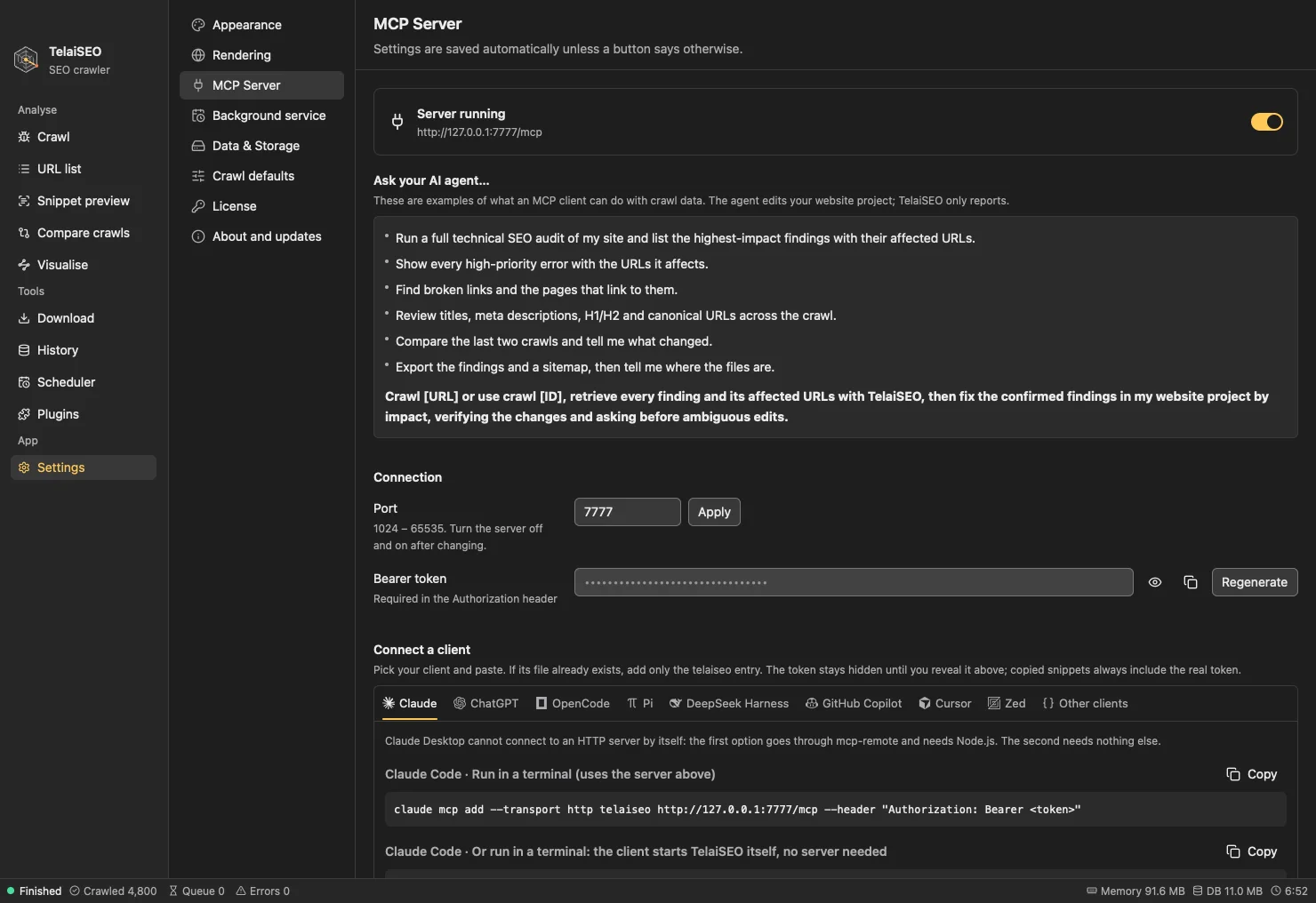
TelaiSEO includes an MCP server with 32 tools: start a crawl, query URLs, list findings, compare crawls, export. It listens only on your computer, behind a token, and stays off until you turn it on.
- Local HTTP or stdio transport
- Setup snippets for Claude, ChatGPT, Cursor, Zed, GitHub Copilot and more
- A headless mode for servers and pipelines
Hand the fixes to an AI
Resolve findings with AI packs the crawl into a ZIP file: one instruction file and one CSV per finding, with a row for every affected URL. Give it to the coding agent that works on your site and let it go through the list.
- Findings grouped by type and impact
- Each finding comes with its description and suggested fix
- Plain files that any agent can read
Contents of the ZIP file AI-FIX-INSTRUCTIONS.md findings/ 001-<finding>.csv 002-<finding>.csv 003-<finding>.csv …Export your results
Every results tab and every report exports from the Export menu: pick CSV, XLSX, JSON, NDJSON or XML in the dialog, for one tab or all of them at once. Ready-made reports cover redirects, canonicals, hreflang, orphan pages, structured data and more, and XML and image sitemaps are generated from the crawl. The CLI and the MCP server write the same formats.
- Formats
CSVXLSXJSONNDJSONXML- Reports
- Crawl summary, redirects, canonicals, hreflang, mixed content, snippet lengths, orphan pages, structured data
- Sitemaps
- XML sitemap, image sitemap
The same crawler, from the terminal
telaiseo-cli runs crawls, exports, reports and comparisons without opening the window. Use it in scripts and pipelines, and add --json when another program reads the output.
- Crawl, export, report, compare, sitemap and more
- JSON output for scripts
Example command telaiseo-cli crawl https://example.com \ --max-urls 5000 \ --export internal \ --export-format xlsx \ --out out/Crawls that run on schedule
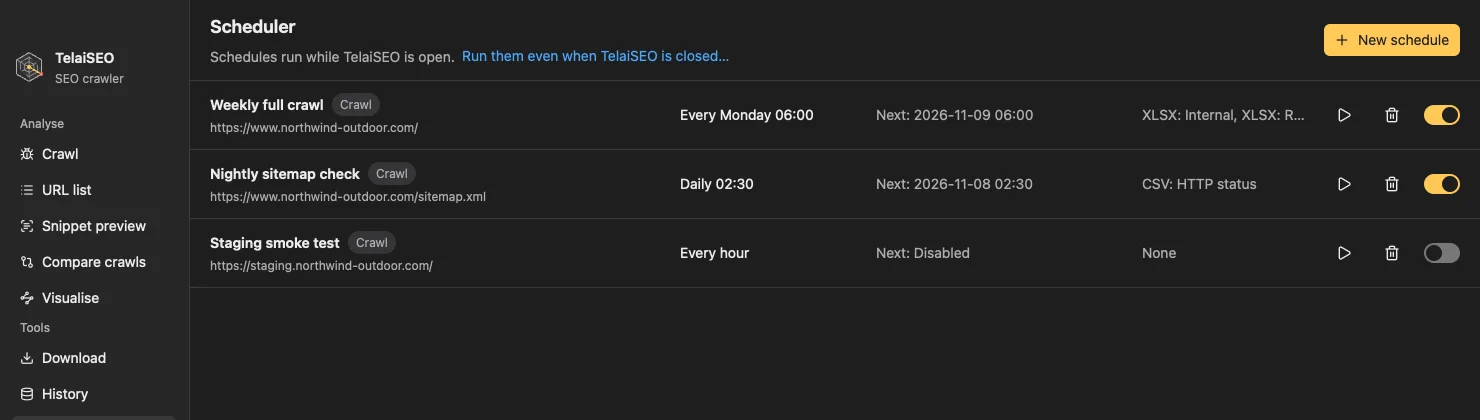
Schedule a crawl once, hourly, daily or weekly. A background service, installed for your user without administrator rights, runs it even when the app is closed.
- Once, hourly, daily or weekly
- Runs while the app is closed


What a crawl covers
One crawl, read from every angle an audit needs.
- Crawl modes
- Site crawl, URL list, Snippet preview and Compare crawls.
- Results
- Nine groups: Pages, On-page, Indexing, Links, Server, Rendering, Markup, AI readiness and Your rules.
- Findings
- About 200 checks. Each one is an Error, a Notice or an Improvement, with its impact and how to fix it.
- AI readiness
- Robots rules for 14 AI crawlers, llms.txt and the content signals that answer engines read.
- JavaScript rendering
- Pages rendered in Chrome, with lab LCP, CLS and TBT and an optional accessibility audit.
- Plugins
- Sandboxed scripts add your own columns, findings and tabs.


Free to try, one license per computer
The free copy does not expire. A license removes the limits.
| Feature | Free | Licensed |
|---|---|---|
| URLs per crawl | Up to 100 | Unlimited |
| Site crawl, URL list and findings | Included | Included |
| Snippet preview, Compare crawls, Visualise and Plugins | Not included | Included |
| MCP server | Not included | Included |
| Scheduled crawls and background service | Not included | Included |
| App updates | Not included | Included |
One license activates one computer. One payment, no subscription.
Licenses are not on sale yet. Download the free copy in the meantime.
Questions
Does the free copy expire?
No. It keeps working with crawls up to 100 URLs.
How many computers does a license cover?
One. Each license activates one computer. To move it, remove the license on the old computer and activate it on the new one.
Does TelaiSEO send my data anywhere?
No. There is no telemetry, and crawl data stays in a local database on your computer. TelaiSEO contacts our servers only to activate your license and to check for updates.
Which languages does the app speak?
Twelve: English, Italian, French, German, Spanish, Portuguese (Brazil and Portugal), Japanese, Dutch, Turkish, Polish and Korean. Exports, the CLI and the MCP server stay in English.

Download TelaiSEO
Version 1.0.0. Start with the free copy and add a license when you need it.
- macOSmacOS 13 or later, Apple silicon and IntelDownload for macOS
- WindowsComing soon
- LinuxComing soon